Quick Start
This guide demonstrates how to integrate and use the VirtualViewList component in your Cocos Creator project.
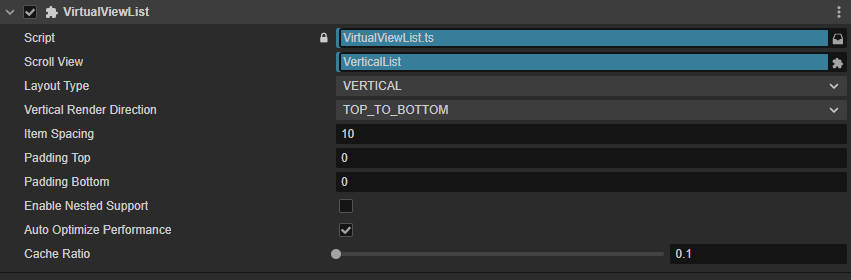
Setup
- Create a
ScrollViewcomponent in your scene - Attach
VirtualViewListscript to the content node - Link the
scrollViewreference in the inspector - Prepare item prefabs or node factory functions
Basic Usage
ts
import { _decorator, Component, Node, Prefab, instantiate, Label } from 'cc';
import { VirtualViewList } from 'assets/Script/Core/VirtualList/VirtualViewList';

const { ccclass, property } = _decorator;

@ccclass('ListExample')
export class ListExample extends Component {
  @property(Prefab)
  itemPrefab: Prefab = null;

  start() {
    const list = this.node.getComponent(VirtualViewList)!;

    // 1. Register template
    list.RegisterTemplate('default', () => instantiate(this.itemPrefab), true);

    // 2. Set callbacks
    list.SetCallbacks({
      onItemInit: (node, index) => this.updateItem(node, index),
      onItemUpdate: (node, index) => this.updateItem(node, index),
      onLoadFinished: () => console.log('List loaded')
    });

    // 3. Load data
    const types = Array(100).fill('default');
    list.ReloadData(types);
  }

  private updateItem(node: Node, index: number) {
    node.getChildByName('Label')!.getComponent(Label)!.string = `Item ${index}`;
  }
}
Core Methods
Data Operations
| Method | Description |
|---|---|
ReloadData(typeArray, customSize?) | Reload all data, clearing old items |
PrependData(newData, keepPosition?, sizes?) | Insert at top, optionally preserve scroll position |
AppendData(newData, sizes?) | Append at bottom, common for pagination |
RefreshData(newData, keepPosition?, compareFunc?) | Incremental refresh, only update changed items |
InsertItemAt(index, type, animate?, size?) | Insert single item at index |
RemoveItemAt(index, animate?) | Remove item at index |
UpdateItemAt(index, type?) | Refresh single item content |
Scroll Control
| Method | Description |
|---|---|
ScrollToIndex(index, duration?, callback?) | Scroll to specific index |
ScrollToTop(duration?, callback?) | Scroll to top |
ScrollToBottom(duration?, callback?) | Scroll to bottom |
Pull-to-Refresh/Load
ts
list.SetCallbacks({
  onPullDownRefresh: async () => {
    const newData = await fetchNewData();
    return { types: newData, sizes: [] };
  },
  onPullUpLoad: async () => {
    const moreData = await fetchMoreData();
    return { types: moreData, sizes: [] };
  }
});
Trigger conditions:
- Pull distance > 50px
- Interval since last trigger > 1 second
- List initialization complete
Common Settings
| Property | Description | Default |
|---|---|---|
layoutType | Layout: VERTICAL / HORIZONTAL / GRID | VERTICAL |
cacheRatio | Preload buffer ratio (0.1 = 10% extra) | 0.1 |
autoOptimizePerformance | Auto-optimize refresh rate and cache | true |
enableNestedSupport | Nested scroll support (outer list only) | false |
Multi-Template Example
ts
// Register multiple templates
list.RegisterTemplates([
  { type: 'text', node: () => instantiate(textPrefab) },
  { type: 'image', node: () => instantiate(imagePrefab) },
  { type: 'banner', node: () => instantiate(bannerPrefab) }
], 'text');

// Specify types in data
const types = ['text', 'text', 'banner', 'image', 'text'];
list.ReloadData(types);
Performance Tips
- Preload: Call
list.PreloadItems(10)beforestartto create nodes ahead - Lightweight Nodes: Simplify item structure, reduce child count
- Lazy Loading: Async load images/resources in
onItemInit - Reasonable Cache: Increase
cacheRatioto 0.2-0.3 for fast scrolling
For more details: