快速开始
本指南演示如何在 Cocos Creator 项目中集成和使用 VirtualViewList 组件。
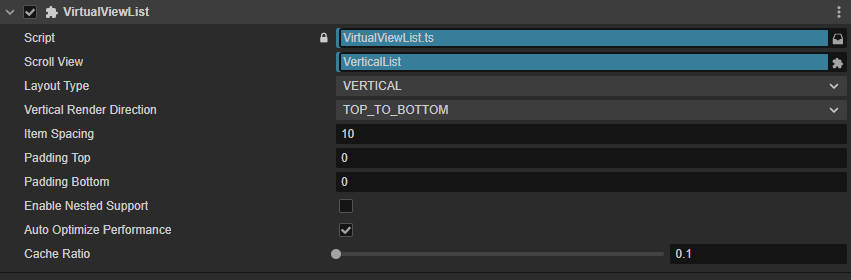
前置准备
- 在场景中创建
ScrollView组件 - 将
VirtualViewList脚本挂载到内容节点(content) - 在属性面板中关联
scrollView引用 - 准备列表项预制体或节点创建函数
基础用法
ts
import { _decorator, Component, Node, Prefab, instantiate } from 'cc';
import { VirtualViewList } from 'assets/Script/Core/VirtualList/VirtualViewList';

const { ccclass, property } = _decorator;

@ccclass('ListExample')
export class ListExample extends Component {
  @property(Prefab)
  itemPrefab: Prefab = null;

  start() {
    const list = this.node.getComponent(VirtualViewList)!;

    // 1. 注册模板
    list.RegisterTemplate('default', () => instantiate(this.itemPrefab), true);

    // 2. 设置回调
    list.SetCallbacks({
      onItemInit: (node, index) => this.updateItem(node, index),
      onItemUpdate: (node, index) => this.updateItem(node, index),
      onLoadFinished: () => console.log('列表加载完成')
    });

    // 3. 加载数据
    const types = Array(100).fill('default');
    list.ReloadData(types);
  }

  private updateItem(node: Node, index: number) {
    // 更新节点显示内容
    node.getChildByName('Label')!.getComponent(Label)!.string = `Item ${index}`;
  }
}
核心方法
数据操作
| 方法 | 说明 |
|---|---|
ReloadData(typeArray, customSize?) | 重新加载全部数据,清空旧数据 |
PrependData(newData, keepPosition?, sizes?) | 顶部插入数据,可保持滚动位置 |
AppendData(newData, sizes?) | 底部追加数据,常用于分页加载 |
RefreshData(newData, keepPosition?, compareFunc?) | 增量刷新,仅更新变化项 |
InsertItemAt(index, type, animate?, size?) | 在指定位置插入单项 |
RemoveItemAt(index, animate?) | 移除指定索引项 |
UpdateItemAt(index, type?) | 刷新单项内容 |
滚动控制
| 方法 | 说明 |
|---|---|
ScrollToIndex(index, duration?, callback?) | 滚动到指定索引 |
ScrollToTop(duration?, callback?) | 滚动到顶部 |
ScrollToBottom(duration?, callback?) | 滚动到底部 |
下拉刷新/上拉加载
ts
list.SetCallbacks({
  onPullDownRefresh: async () => {
    const newData = await fetchNewData();
    return { types: newData, sizes: [] };
  },
  onPullUpLoad: async () => {
    const moreData = await fetchMoreData();
    return { types: moreData, sizes: [] };
  }
});触发条件:
- 拉动超过 50px
- 距上次触发间隔 > 1 秒
- 列表已完成初始化
常用配置
| 属性 | 说明 | 默认值 |
|---|---|---|
layoutType | 布局类型:VERTICAL / HORIZONTAL / GRID | VERTICAL |
cacheRatio | 预加载缓冲比例(0.1 = 多加载 10% 的项) | 0.1 |
autoOptimizePerformance | 自动优化刷新率和缓存 | true |
enableNestedSupport | 嵌套滚动支持(外层列表开启) | false |
多模板示例
ts
// 注册多个模板
list.RegisterTemplates([
  { type: 'text', node: () => instantiate(textPrefab) },
  { type: 'image', node: () => instantiate(imagePrefab) },
  { type: 'banner', node: () => instantiate(bannerPrefab) }
], 'text');

// 数据中指定类型
const types = ['text', 'text', 'banner', 'image', 'text'];
list.ReloadData(types);
性能优化建议
- 预加载:在
start前调用list.PreloadItems(10)预创建节点 - 轻量节点:简化列表项结构,减少子节点数量
- 延迟资源加载:在
onItemInit中异步加载图片等资源 - 合理缓存:快速滚动场景适当提高
cacheRatio到 0.2-0.3
更多详情请查看: